Here are 2 videos of the same track.
First one is the official music video, which features some really clever, but subtle, video tricks.
The second one is the live version. Check out Dan Le Sac on his Apple Notebook with some other gadget attached to it. Sounds pretty cool.
Showing posts with label gadgets. Show all posts
Showing posts with label gadgets. Show all posts
Friday, March 30, 2007
Studley by name, Studley by nature
Back in the mid 90s, I remember picking up a magazine at the military dentist. Airforce magazine or flight international or something like that. Inside was a picture I stared and stared at. It was an advertisement for something, I can't remember what - but I never forgot the image.
It's been well over 10 years and I was chatting to my mate Irish Stu about this tool chest I once saw, and how impressive it was.
Well, after describing it to Stu, I figured I do my darndest to find it on the web.
Using image google, I was surprised to find it within minutes.....so here it is:
 The Studley Tool Chest
Fine Woodworking Magazine Article (incl High Res downloads)
It's been well over 10 years and I was chatting to my mate Irish Stu about this tool chest I once saw, and how impressive it was.
Well, after describing it to Stu, I figured I do my darndest to find it on the web.
Using image google, I was surprised to find it within minutes.....so here it is:
 The Studley Tool Chest
Fine Woodworking Magazine Article (incl High Res downloads)


Monday, December 04, 2006
Buy some Uranium online
 Not to be outdone by my previous post about how impressive the web has become, how about this: http://unitednuclear.com
Buy some radioactive material for the hell of it. I bet Osama is pissed off he can't get a Credit Card....but wait, they take paypal.
To be fair, I just noticed that this website will not ship outside of the US, which is really lucky for the rest of us at least that the US has narrowed down a safe haven to sell uranium and other radioactive material. There are obviously no idiots living in the land of the free.
The site has a disclaimer:
Because our products can be potentially hazardous in the wrong hands, we will occasionally terminate & refund orders if we feel you are juvenile posing as an adult, inexperienced with the materials ordered, or using our products to make any sort of explosive device.
That makes me feel all warm inside. How about you?
Wednesday, November 08, 2006
Best Inventions of 2006
I have been incredibly busy lately, so apologies for not blogging. (well actually I haven't been that busy, but ya know how sometimes you look at the calendar and realise it's a month later than you thought?)
Here is a pretty interesting read:
http://www.time.com/time/2006/techguide/bestinventions/
Here is a pretty interesting read:
http://www.time.com/time/2006/techguide/bestinventions/

Thursday, September 21, 2006
Solaire 56 Inch Gas Grill On Refrigerated Cart

This large 56″ Solaire grill will not just churn-up enough stuff for your barbeque party but will serve your chilled beer needs too with its integrated refrigerated base cabinet. The grill is made in stainless steel and it features two ceramic infrared burners and one double-lanced ported U-burner totaling 82,500 BTU. The unit includes 18,000 BTU infrared rear burner with heavy-duty rotisserie motor, spit rod, and forks. The refrigerator features door section with adjustable shelves and two drawers with removable stainless steel food pans. The unique chill and grill unit sells for $13,699 USD.
Oh yeah. There's a Binford moment for ya.
USB everything?
USBcell
This is pretty cool...Rechargeable Batteries using USB. You can charge them anywhere you have a computer.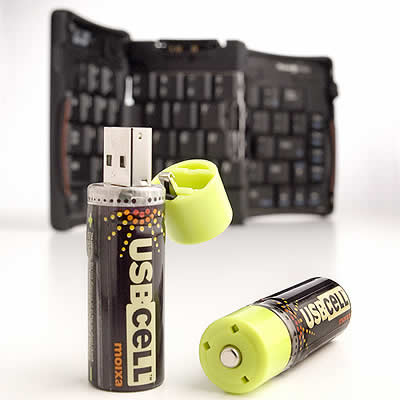
USBcell website
Monday, September 18, 2006
Everyone needs a spiral cellar
OK. The weekend after I make the DIY wind generator, I am going to make one of these with my Dremel. (the fact that right below truantpad is fatnazidoghatingtaiwaneseman only encourages me to pursue this...)
Hmm, interesting. No really it is. I have always liked the idea of trap doors n shit like that. That's one problem with 20th & 21st Century buildings I find: lack of decent trapdoors.
Perhaps this is the next thing to be incorporated into the design of truantville. Would be quite handy for putting annoying visitor's children.
But...check out these quotes from the site. A bit of a worry:
spiralcellars.com
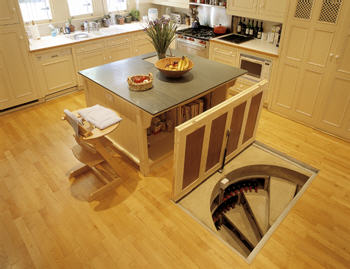 going to make one of these with my Dremel. (the fact that right below truantpad is fatnazidoghatingtaiwaneseman only encourages me to pursue this...)
From spiralcellars.com:
The Spiral Cellar system was first developed by a Frenchman, Georges Harnois, in 1978, who recognised that few modern houses had cellars, but people still wanted somewhere to store their wine.It can keep up to 1,600 bottles in ideal storage conditions and since, like a traditional cellar, it relies on the surrounding earth for its insulation, plus an ingenious air-flow system, it requires no power to maintain its constant temperature.
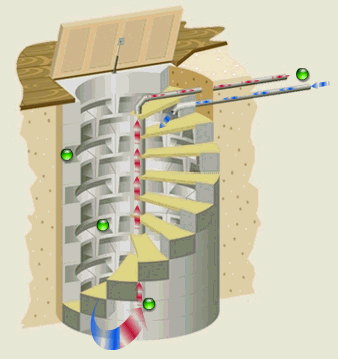
Hmm, interesting. No really it is. I have always liked the idea of trap doors n shit like that. That's one problem with 20th & 21st Century buildings I find: lack of decent trapdoors.
Perhaps this is the next thing to be incorporated into the design of
 truantville. Would be quite handy for putting annoying visitor's children.
But...check out these quotes from the site. A bit of a worry:
"The cellar in the garage has been such a success, my husband has decided he'd like to install a second one in the kitchen" Jolly good, eh what?!What about "Cos it's wicked man" and "It's the shit"? Oh well, guess that's what I am not in marketing.
"Having a proper wine cellar is like a badge of honor that proves you enjoy food, drink, and the finer things in life" Too rah, old chap!
spiralcellars.com
Saturday, September 16, 2006
DIY Wind Generator

I'd really like to make one of this next weekend. Seriously.
We have a 2m x 4m balcony, so I reckon I could do it. Better not, Jack likes to hang out there so if there are blades out there chopping in the wind - well, it might end in tears. Maybe up on the roof of the building....hmmm.
From the instructables website...
Chispito Wind GeneratorThe Chispito Wind Generator was designed to be simple and efficient with fast and easy construction. There are no limits to what you can do with wind power. There is nothing more rewarding and empowering than making a wind powered generator from scrap materials. Most of the tools and materials in this manual can be found in your local hardware shop or junk pile.
Chispito Wind Generator
A really good NZ article about converting washing machines into Wind Generators
Another excellent wind generator site
Monday, September 04, 2006
Dr. Dre - mel
I was lucky enough to visit Vancouver last week for work. It's a really nice place, and it's growing on me.
We switched hotels from the last couple of visits, and the prompt calculations to the nearest pub resulted in "The Flying Beaver" coming up as the best contender.
What a find that was, turned out to be waaaay better than the Foggy Dew, but to be fair, the Dew was about 30 meters away which was nice.
The Flying Beaver is a conversion of a Flying Clubrooms or something like that. There is a dock out the front for the Beavers (yes the planes with floats) to tie up alongside.
I was a nice way to end a day of strenuous work by having a pint of Red Truck Beer (or whatever else the special was) and a nice meal of Halibat or Salmon or ....er....the Big Kahuna Burger, all while watching Flying Beavers land on the river at sunset. Quite habit forming really.
Contrary to popular opinion, I didn't have much time to do anything apart from work while I was there, but this time it was my mission to try to do a tiny bit of shopping. I find clothes (that fit) damn near impossible to find in Taipei, so it's handy to buy those whenever I am in a western country. DVDs are also favorites to hunt out. This time however, the hotel was right across the road from a Rona DIY store, and next to a Costco. On the way to/from the office was another cluster of shops that had a Home Depot and a few other things....so all in all my visits to stores consisted of:
Rona = 3 times.
Home Depot = 2 times.
Costco = 1 time.
The Future Store = 1 time.
5 visits to DIY stores in 5 days. Pretty impressive indeed.
I was thinking about checking out the electrical gadgets at the Future Store, but soon after entering I realised that living in Taiwan likened me to an eskimo going to Jamaica to buy a refrigerator.
DIY shopping was where is was at, so it really became an exercise of what CAN I fit into my check-in luggage.
I had to hold myself back in the end, but what I did leave Vancouver with was a Dremel kit. The new 10.8v 35,000 rpm cordless one. ("Corded performance, Cordless convenience" the box says). I had a "Binford" moment, and decided to get some Dremel accessories (yes they are probably available in Taiwan, but it was nice to be able to read/speak in english) I ended up with the Dremel Workstation, which is a mini drill press thing, fully adjustable for angles & depth....and a Dremel Plunge router. Oh yeah, some router bits too.
I was tempted to buy more, but thought I was getting carried away as it was so left it at that.
Now I have got to find some projects to make use of this stuff - I really could have done with a Dremel when I did the iPod charger project, as it took about an hour just to cut that hole for the rocker switch nicely. I just had a look at the Dremel website. You know you are in North America when they have a Dremel Cordless Pumpkin Carving tool.
So, a good week of therapy for me. It's nice to get away from the craziness of Taiwan now and then and feel like I am 'normal' for a while (but who am I kidding right?)
5 nights. 4 visits to the Flying Beaver, and 1 visit to a place called.....Anton's. :)
Flying Beaver
Red Truck Beer
Rona DIY
Home Depot
Dremel website
Story about a guy who made a boat in his apartment using a Dremel
Anton's Pasta Bar
We switched hotels from the last couple of visits, and the prompt calculations to the nearest pub resulted in "The Flying Beaver" coming up as the best contender.

What a find that was, turned out to be waaaay better than the Foggy Dew, but to be fair, the Dew was about 30 meters away which was nice.
The Flying Beaver is a conversion of a Flying Clubrooms or something like that. There is a dock out the front for the Beavers (yes the planes with floats) to tie up alongside.
I was a nice way to end a day of strenuous work by having a pint
 of Red Truck Beer (or whatever else the special was) and a nice meal of Halibat or Salmon or ....er....the Big Kahuna Burger, all while watching Flying Beavers land on the river at sunset. Quite habit forming really.
Contrary to popular opinion, I didn't have much time to do anything apart from work while I was there, but this time it was my mission to try to do a tiny bit of shopping. I find clothes (that fit) damn near impossible to find in Taipei, so it's handy to buy those whenever I am in a western country. DVDs are also favorites to hunt out. This time however, the hotel was right across the road from a Rona DIY store, and next to a Costco. On the way to/from the office was another cluster of shops that had a Home Depot and a few other things....so all in all my visits to stores consisted of:
Rona = 3 times.
Home Depot = 2 times.
Costco = 1 time.
The Future Store = 1 time.
5 visits to DIY stores in 5 days. Pretty impressive indeed.
I was thinking about checking out the electrical gadgets at the Future Store, but soon after entering I realised that living in Taiwan likened me to an eskimo going to Jamaica to buy a refrigerator.
DIY shopping was where is was at, so it really became an exercise of what CAN I fit into my check-in luggage.
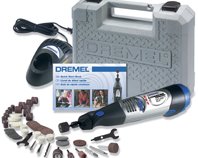
I had to hold myself back in the end, but what I did leave Vancouver with was a Dremel kit. The new 10.8v 35,000 rpm cordless one. ("Corded performance, Cordless convenience" the box says). I had a "Binford" moment, and decided to get some Dremel accessories (yes they are probably available in Taiwan, but it was nice to be able to read/speak in english) I ended up with the Dremel Workstation, which is a mini drill press thing, fully adjustable for angles & depth....and a Dremel Plunge router. Oh yeah, some router bits too.
I was tempted to buy more, but thought I was getting carried away as it was so left it at that.
Now I have got to find some projects to make use of this stuff - I really could have done with a Dremel when I did the iPod charger project, as it took about an hour just to cut that hole for the rocker switch nicely. I just had a look at the Dremel website. You know you are in North America when they have a Dremel Cordless Pumpkin Carving tool.
So, a good week of therapy for me. It's nice to get away from the craziness of Taiwan now and then and feel like I am 'normal' for a while (but who am I kidding right?)
5 nights. 4 visits to the Flying Beaver, and 1 visit to a place called.....Anton's. :)
Flying Beaver
Red Truck Beer
Rona DIY
Home Depot
Dremel website
Story about a guy who made a boat in his apartment using a Dremel
Anton's Pasta Bar
Sunday, August 06, 2006
Make an iPod power pack for $7USD
You may have noticed my earlier post with a link to making your own iPod power pack.I can't help thinking it was pretty complex and while it is small, how long would it charge for?
I thought I would put my money where my mouth is and have a go and making one based on something I thought up myself and as I so willingly suggested to a poster on forumosa.com who was looking for an iPod power pack.
The basic theory was to get a Car accessory -USB adaptor, and rip it to bits, combine it with some batteries and presto, have a power pack to charge an iPod away from any usual power source.
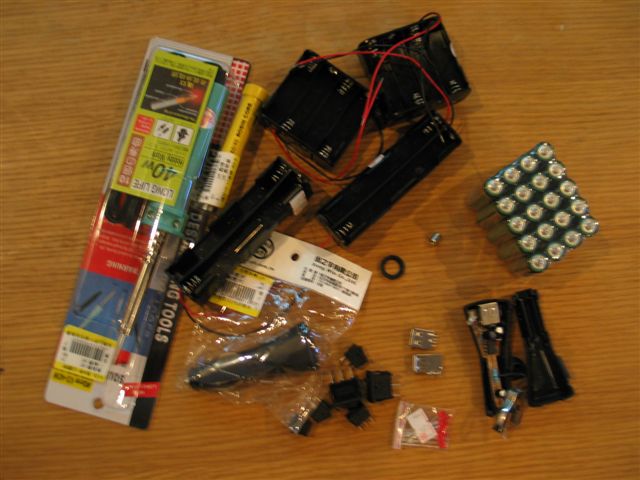
So I went to Guang Hua Computer Market today and picked up some bits. As you will see in the photo, I got carried away with various shaped battery holders and cases, and different switches, just to make sure I had all options covered. Here is a photo of everything that I bought, including a soldering iron (80nt - and that wasn't the cheapest!)

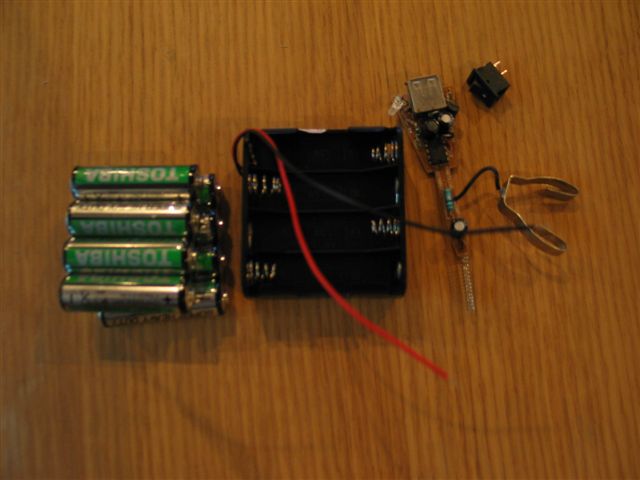
Here is a photo of the bare minimum bits you'd need based on a 12v DC input (8 x 1.5 AAs - but you will see I used a different configuration to this)
The final parts list (that I used) is as follows:
1 x Car Accessory-USB adaptor = 90nt
2 x 8AA battery holders = 40nt
1 x rocker switch = 12nt
16 x AA heavy duty batteries = 79nt
1 x Black plastic project case = 80nt
total price = 301nt (including batteries)
total price = 222nt (unit only) About $7 USD!!

First step was to take the Car Adaptor to bits. A blade screwdriver in the seam and it was in bits.
A small sticker on the adaptor stated:
Input: DC 12V-24V Output: DC 5.0V +- 5% Max: 500mA
Wha,wha....what? This handles 24V input? So, after thinking about this for 2 seconds, I figured 16 AAs would be better than 8. Will last longer. :)
After a bit of jiggling around I found that I had to use the 2 long battery holders instead of the 2 flat ones.
I had bought a new LED so I could have a power indicator, as I presumed the one on the adaptor would be in the wrong position. After some testing, I discovered the adaptor LED was a hi-tech 2 color unit that indicated green for 'ready' (input ok) and red for 'charging'. I desperately wanted to keep this feature, so I carefully bent the LED around so it would sit in a hole beside the USB slot in the case.
Next step was to cut the holes for the USB slot, LED and the rock switch.
I positioned these all at one end, using the space not occupied by the battery holders
I used a drill to make some holes which I finished off with a craft knife and needle file. That took the longest time, about an hour for a decent job.
Then it was just a matter of assembling the switch and USB unit, with attached LED into the case. Due to precision hole making, these were a nice push fit.
Then it was a matter of soldering the wires from the battery holders to each other (+tve to -tve) and one to the USB unit, one to the switch, and one between the switch and the USB unit.
I should mention at this point that some web research outlined that the center pin part of those adaptors is +tve.
I melted a bit of excess plastic with the soldering iron to anchor the other end of the USB unit to the case.
Some tape tidied the only wire-to-wire soldering and it was ready for business. I packed out the battery to case void with some polystyrene wedges to stop it all rattling around.
As you can see, it works a treat and it actually looks quite professional too...
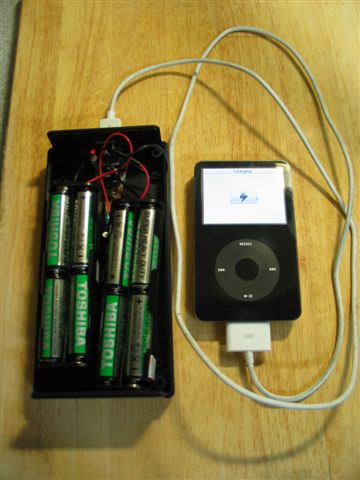
The rest of the Photos show: Before the lid goes on.
With the lid on, charging iPod.Red LED indlicates charging.
The complete unit is a reasonable size, but with 24V on board, I am hoping it would be good for a few charges.
Conclusion:
220nt for a battery pack for any USB charged device is pretty cheap.
A couple of hours to make it, and I am not into electronics (no kidding, I had to even buy an iron).
Well worth the effort I reckon.
 If you were a real geek:
You could put in a external DC input, and a charging circuit. Then you could use rechargable batteries which would save money in the long run, but I figure I wont actually use this unit more than a few times a year MAX so I'll just stick with 80nt worth of once-use batteries.
Some things I'd like to know though....
What sort of safety features would be good to put in there (i.e. a fuse)?
How long will 24VDC for 16 x 1.5v AAs provide charge at 5VDC 500mA max?
What about heat?
Disclaimer: I just built this to see if it could be done, I haven't tested it in any way, so if you want to make one, do so bearing this in mind...
I thought I would put my money where my mouth is and have a go and making one based on something I thought up myself and as I so willingly suggested to a poster on forumosa.com who was looking for an iPod power pack.
The basic theory was to get a Car accessory -USB adaptor, and rip it to bits, combine it with some batteries and presto, have a power pack to charge an iPod away from any usual power source.
So I went to Guang Hua Computer Market today and picked up some bits. As you will see in the photo, I got carried away with various shaped battery holders and cases, and different switches, just to make sure I had all options covered. Here is a photo of everything that I bought, including a soldering iron (80nt - and that wasn't the cheapest!)
Here is a photo of the bare minimum bits you'd need based on a 12v DC input (8 x 1.5 AAs - but you will see I used a different configuration to this)
The final parts list (that I used) is as follows:
1 x Car Accessory-USB adaptor = 90nt
2 x 8AA battery holders = 40nt
1 x rocker switch = 12nt
16 x AA heavy duty batteries = 79nt
1 x Black plastic project case = 80nt
total price = 301nt (including batteries)
total price = 222nt (unit only) About $7 USD!!

First step was to take the Car Adaptor to bits. A blade screwdriver in the seam and it was in bits.
A small sticker on the adaptor stated:
Input: DC 12V-24V Output: DC 5.0V +- 5% Max: 500mA
Wha,wha....what? This handles 24V input? So, after thinking about this for 2 seconds, I figured 16 AAs would be better than 8. Will last longer. :)
After a bit of jiggling around I found that I had to use the 2 long battery holders instead of the 2 flat ones.
I had bought a new LED so I could have a power indicator,
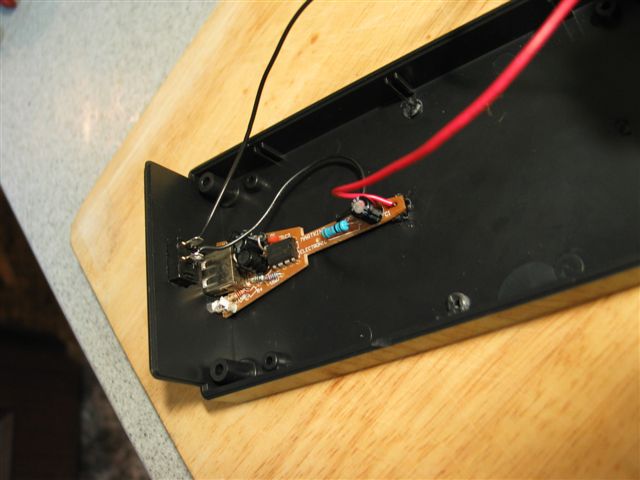 as I presumed the one on the adaptor would be in the wrong position. After some testing, I discovered the adaptor LED was a hi-tech 2 color unit that indicated green for 'ready' (input ok) and red for 'charging'. I desperately wanted to keep this feature, so I carefully bent the LED around so it would sit in a hole beside the USB slot in the case.
Next step was to cut the holes for the USB slot, LED and the rock switch.
I positioned these all at one end, using the space not occupied by the battery holders
I used a
 drill to make some holes which I finished off with a craft knife and needle file. That took the longest time, about an hour for a decent job.
Then it was just a matter of assembling the switch and USB unit, with attached LED into the case. Due to precision hole making, these were a nice push fit.
Then it was a matter of soldering the wires from the battery holders to each other (+tve to -tve) and one to the USB unit, one to the switch, and one between the switch and the USB unit.
I should mention at this point that some web research outlined that the center pin part of those adaptors is +tve.
I melted a bit of excess plastic with the soldering iron to anchor the other end of the USB unit to the case.
Some tape tidied the only wire-to-wire soldering and it was ready for business. I packed out the battery to case void with some polystyrene wedges to stop it all rattling around.
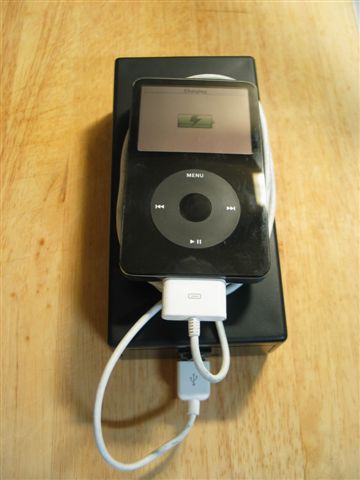
As you can see, it works a treat and it actually looks quite professional too...
The rest of the Photos show: Before the lid goes on.
With the lid on, charging iPod.Red LED indlicates charging.
The complete unit is a reasonable size, but with 24V on board, I am hoping it would be good for a few charges.
Conclusion:
220nt for a battery pack for any USB charged device is pretty cheap.
A couple of hours to make it, and I am not into electronics (no kidding, I had to even buy an iron).
Well worth the effort I reckon.
 If you were a real geek:
You could put in a external DC input, and a charging circuit. Then you could use rechargable batteries which would save money in the long run, but I figure I wont actually use this unit more than a few times a year MAX so I'll just stick with 80nt worth of once-use batteries.
Some things I'd like to know though....
What sort of safety features would be good to put in there
 (i.e. a fuse)?
How long will 24VDC for 16 x 1.5v AAs provide charge at 5VDC 500mA max?
What about heat?
Disclaimer: I just built this to see if it could be done, I haven't tested it in any way, so if you want to make one, do so bearing this in mind...
Tuesday, July 04, 2006
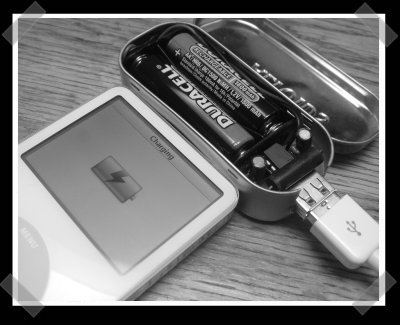
Make your own battery powered iPod charger
I have seen 1 or 2 'powerbricks' around. They are basically a big battery pack that allow you to charge up or run another device, like an iPod, Pocket PC, digital camera or whatever in situations where you normally don't have easy access to 110/240v - such as a Camel Caravan in the Sahara or on a long-haul aircraft flight. The problem with these commercially available things is they are freakishly expensive.
Saturday, June 10, 2006
Sonicrave
I have been reading a website for about 3 years now, by a guy Rob Cockerham. The site is www.cockeyed.com. It's an interesting site full of pranks, weird experiments and lost of interesting trivia type stuff.
One of my favorite stories is the one when he tried to win a Chevy Trailblazer. Especially the Epilogue on page 3.
 Anyway, he has just done a blurb on 4 awesome products and the second one he chose, was the Sonicare Toothbrush. Recently, Joyce was raving about the orgasmic Sonicare also. Both these people are semi-insane, so I take them seriously.
I had to go get one of these Sonicare toothbrushes for myself.
Firstly, I have already got a Braun Electric toothbrush and 2 days ago, I thought to myself why would I possibly need another electric toothbrush?
Rob said "If you don't have a Sonicare right now, get one when you get paid, or ask for one on your birthday. They will change your life, and probably save you money at your dentist."
Joyce said "oh,oh,ohhhhhhhhhhh.......It's the best money I've ever spent"
So that was it, I went to the 3C and got one. They had three models, but the guy subtlely pointed out the NEW model, the e7300 elite. (like I was ever going to buy any other model)

Well, firstly....it is friggen amazing....and orgasmic. They were not lying to me. I used it 6 times the first night.
So why is it so good? Let me explain. My last braun toothbrush died about 6 months ago, and when I got a new one I took the old one to bits. There wasn't much to it, just a ni-cad AA battery core and a 50 cent electric motor in it, like slotcar motor, only cheaper. They was a plastic cam arrangement (and egg shaped thing) that coverted the rotary motion into a back-and-forth jiggle. That's it. Oh yeah, and a clickclack switch to make it all happen. This is 1910 technology, people.
I haven't take the Sonicare apart (yet) but my observations indicate a few things. It has a signal type activation button, no click clack. It has beeps, it had multicolored status LEDs and programmable timer. This in DIGITAL baby - A friggen computer.
(Philips is the company that invented the CD, so it's hardly surprising)
Apart from that, it uses a classy induction charger and they say it lasts for 2 weeks between chargers, so they include a nice travel case with it - for your up-to-2-week holiday.
I have no idea what the technology is that makes the sonic head do it's digital-sonic thing, but it's amazing. I have never had teeth so clean, so easily.
So there you go. Rush out and buy one of these. It's really expensive, but if it saves one trip to the dentist, it's paid for itself like that, and I am convinced it will.
Sonicare e7300 Elite website
Cockeyed.com
One of my favorite stories is the one when he tried to win a Chevy Trailblazer. Especially the Epilogue on page 3.
 Anyway, he has just done a blurb on 4 awesome products and the second one he chose, was the Sonicare Toothbrush. Recently, Joyce was raving about the orgasmic Sonicare also. Both these people are semi-insane, so I take them seriously.
I had to go get one of these Sonicare toothbrushes for myself.
Firstly, I have already got a Braun Electric toothbrush and 2 days ago, I thought to myself why would I possibly need another electric toothbrush?
Rob said "If you don't have a Sonicare right now, get one when you get paid, or ask for one on your birthday. They will change your life, and probably save you money at your dentist."
Joyce said "oh,oh,ohhhhhhhhhhh.......It's the best money I've ever spent"
So that was it, I went to the 3C and got one. They had three models, but the guy subtlely pointed out the NEW model, the e7300 elite. (like I was ever going to buy any other model)

Well, firstly....it is friggen amazing....and orgasmic. They were not lying to me. I used it 6 times the first night.
So why is it so good? Let me explain. My last braun toothbrush died about 6 months ago, and when I got a new one I took the old one to bits. There wasn't much to it, just a ni-cad AA battery core and a 50 cent electric motor in it, like slotcar motor, only cheaper. They was a plastic cam arrangement (and egg shaped thing) that coverted the rotary motion into a back-and-forth jiggle. That's it. Oh yeah, and a clickclack switch to make it all happen. This is 1910 technology, people.
I haven't take the Sonicare apart (yet) but my observations indicate a few things. It has a signal type activation button, no click clack. It has beeps, it had multicolored status LEDs and programmable timer. This in DIGITAL baby - A friggen computer.
(Philips is the company that invented the CD, so it's hardly surprising)
Apart from that, it uses a classy induction charger and they say it lasts for 2 weeks between chargers, so they include a nice travel case with it - for your up-to-2-week holiday.
I have no idea what the technology is that makes the sonic head do it's digital-sonic thing, but it's amazing. I have never had teeth so clean, so easily.
So there you go. Rush out and buy one of these. It's really expensive, but if it saves one trip to the dentist, it's paid for itself like that, and I am convinced it will.
Sonicare e7300 Elite website
Cockeyed.com
Wednesday, May 10, 2006
Make a Dog Catching Pole
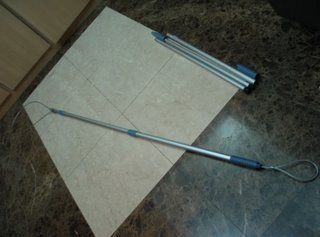
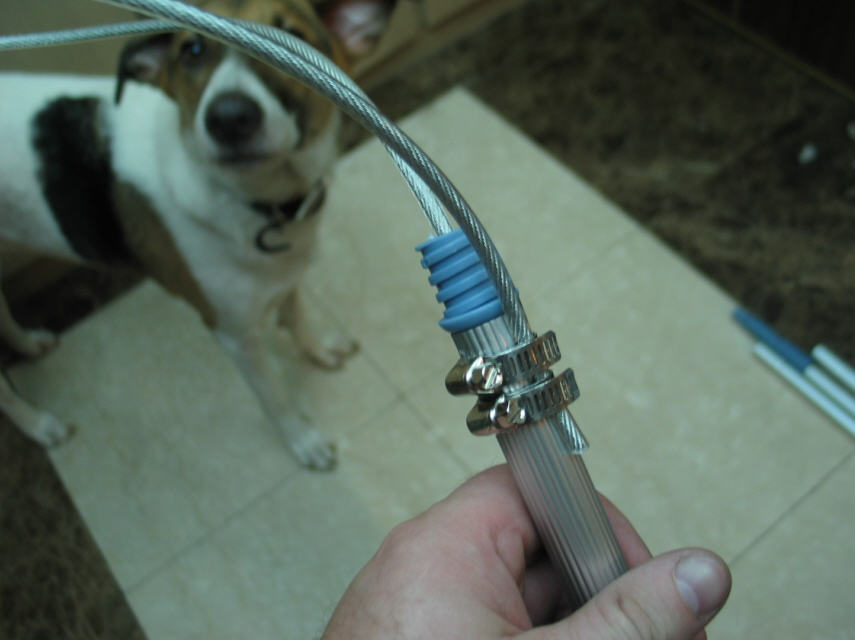
I have made few of these for AnimalsTaiwan.org mainly because they are not readily available in Taiwan, but also, the commercial poles in the US run towards $100+ USD. The pole shown here costs approx $200nt (about $6-7USD) and half an hour or so to make. This pole is not as good as a commercial pole, but is ideal for voluntary organizations or for people who just need to use one occasionally.
Guidlines about humane animal handling
Tomahawk Control Poles
Ketch-All animal control equipment
Alana Ecology Control Poles
The most difficult part to find is plastic coated cable. Dogs will bite the loop, so plastic coax or similar is not strong enough. Some alternatives for sourcing the cable are cable based plastic covered clothes line, and long bicycle cable locks.
I was recently in Canada on business and found some 3/16” plastic coated aircraft cable at a Home Depot for 36 cents CND a foot.
What you need: (prices quoted in Taiwan Dollars. 30nt = 1 USD)
- 1 standard extendable mop/broom utility pole ($85nt)
- 10ft plastic coated steel cable (approx 100nt)
- 2 Hose Clips ($35nt for 4)
- 2 Metal Squash type Cable clips/clamps (5 nt or so) or a few plastic cable ties.
- 1 Roll of Electrical Tape (10nt)
Tools:
- 1 Electric or hand drill
- 1 3/16” or ¼” drill bit (slightly bigger than the cable)
- 1 Pair of pliers
- 1 Screwdriver
- 1 Dog (for testing purposes)

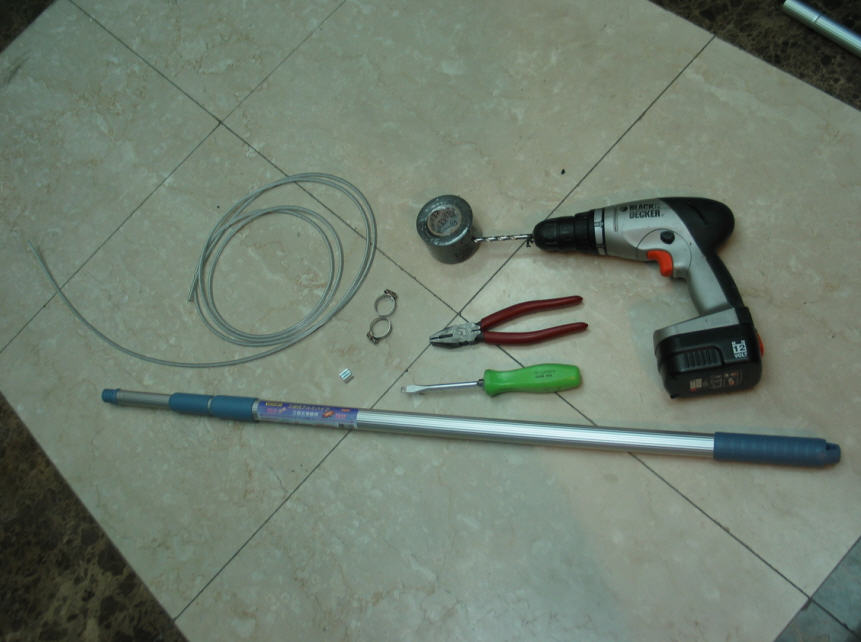
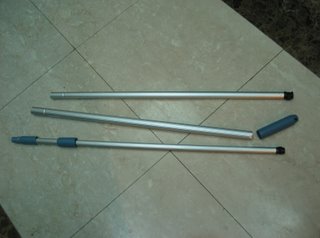
- Disassemble the pole enough to enable drilling of the locking mechanism. If it’s a 3-piece pole (as shown) the disassembly is a PITA and you have 2 mechanisms to drill thru. On the 3-piece poles, if you fully extend the pole and keep twisting the joint counter-clockwise while pulling really hard, the joint comes apart. Don’t twist clockwise as this will activate the lock and make it impossible. If it’s a 2-piece pole, then you’ll just need to take of the cap handle to do the drilling. Note: I choose 3-piece poles for the extra strength, and tape up the small extension, which is weak.
- Drill through the threaded end of the pole, the locking mechanisms and the end cap. Make sure the drill is perfectly aligned with the pole when drilling, especially for the locking mechanisms, which are quite thin where the drill penetrates.

- Thread the cable through all the pieces before re-assembly. It can be tricky to get the cable through the last hole, which is usually the threaded end when I do it. Usually, some jiggling around gets it in the hole after a few attempts. Make sure there is enough cable out each end for the dog loop and the hand loop.
- Reassemble the pole. For a 3-piece pole, it’s a matter of forcing the joints back together by twisting. For a 2-piece pole, it’s just a matter of putting on the cap handle again.
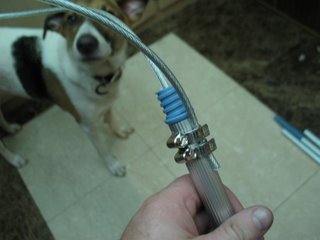
- Use the 2 hose clips to clamp the loose end of the cable as near to the thread end as possible. This will clamp onto the plastic end inside the tube for extra strength.
- Use the cable clips (or some plastic cable ties) to form a hand loop at the other end. This loop needs to be strong as once the pole is in use, this loop will support the full weight of the dogcatcher as he or she gets dragged along by a raging stray dog.
- Tidy up. Wrap the sharp edges of the hose clips with electrical tape. If you used plastic cable ties for the hand loop, it is worth wrapping these in tape also. When taping the hose clips, I also lock the small extension joint and tape it also, to prevent use and increase rigidity of the pole.

- Test. Extend the pole and lock the joints. There should be enough loop to fit over a dog’s head. To close the loop up it’s a matter of holding the pole with one hand an pulling the hand loop back. If the catching situation is hostile the pole itself can be let go and the dog can still be retained by holding onto the hand loop only. The Dog will naturally try to get away and the loop will tighten, giving the catcher time to regain control of the pole.

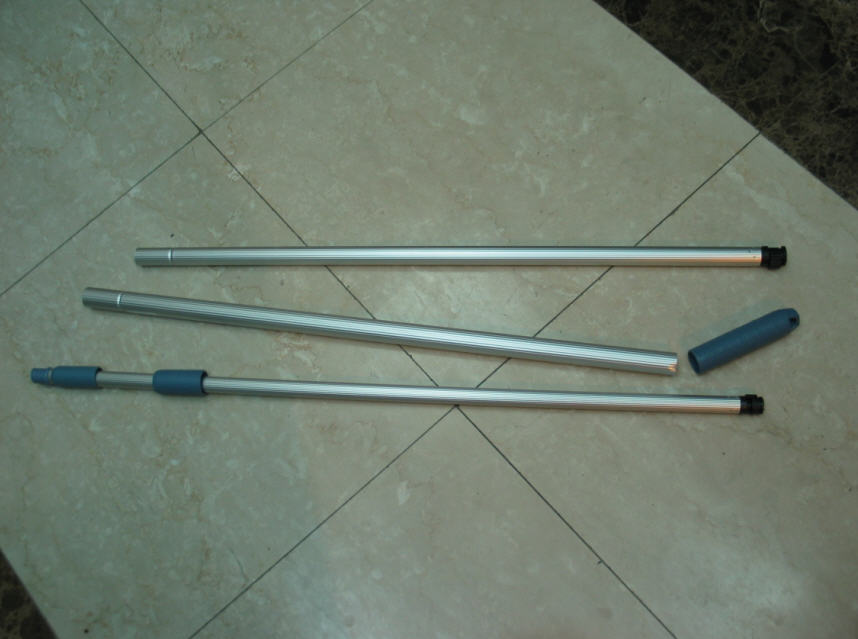
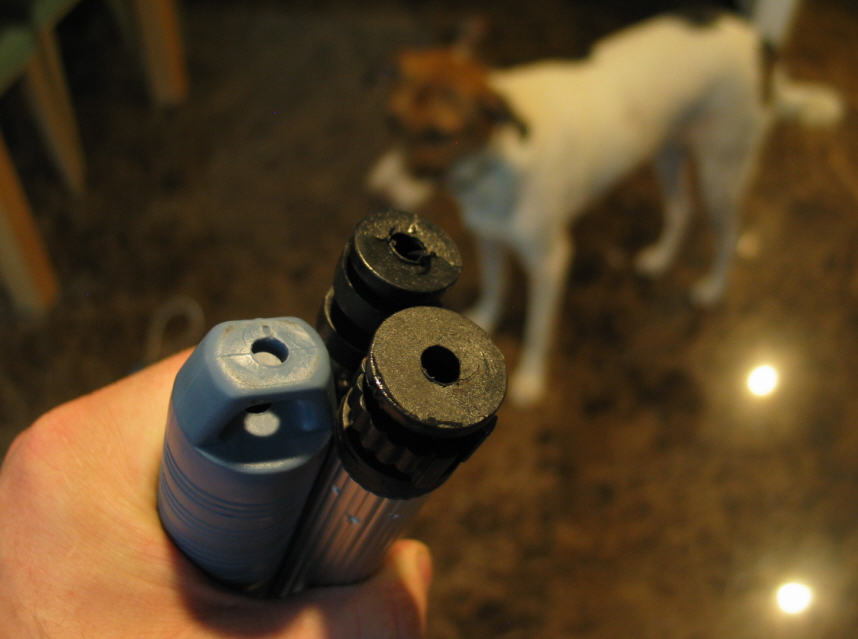



Guidlines about humane animal handling
Tomahawk Control Poles
Ketch-All animal control equipment
Alana Ecology Control Poles
Subscribe to:
Posts (Atom)
